How to do a TikTok photo download
- Copy the photo post link. Open the slideshow in TikTok, tap Share and choose Copy link. Any slide of the post gives the same link. On a computer, copy the address bar.
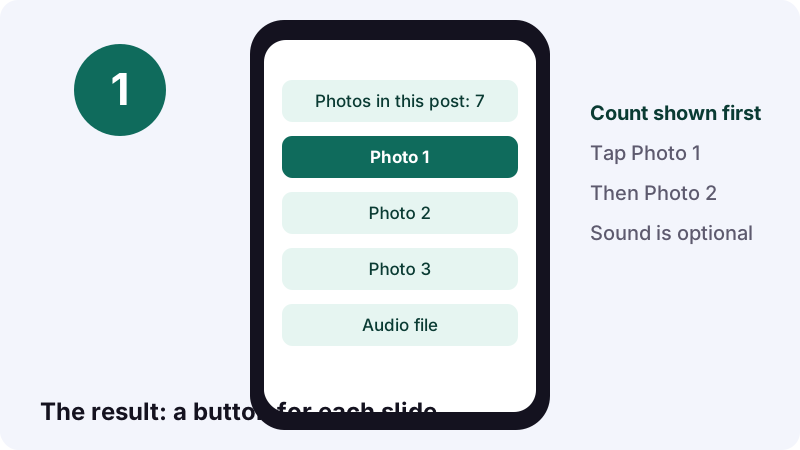
- Paste it on this page. Tap the box at the top, paste and tap Download. The page shows how many photos the post holds, with one button per picture.
- Save the pictures you want. Tap Photo 1, Photo 2 and so on. Each one saves as a JPEG. Finish within an hour, because the links expire after that.
Quick answer: what do you get from a photo post link?
You get every picture of a public TikTok photo post as a separate JPEG, plus the post's sound if you want it. Paste the link, see how many photos the post holds, and tap one button per picture.
Quick answer: Share, Copy link, paste here, tap Download, then Photo 1, Photo 2 and so on. A TikTok photo download is free, needs no login and leaves no copy on our side.
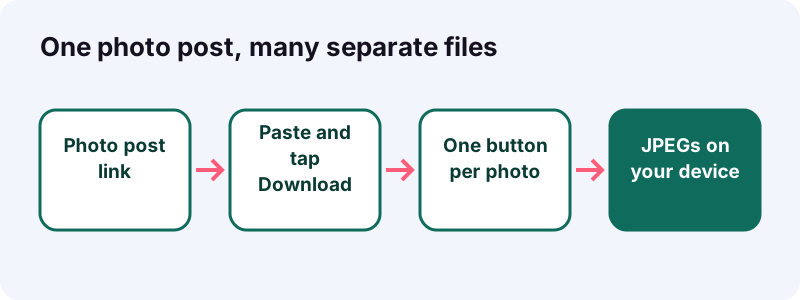
Photo posts have no video file behind them, so you won't see an MP4 button for most slideshows. That's normal: TikTok stores those posts as a set of images with a soundtrack.
- A line with the number of photos in the post.
- One button per picture: Photo 1, Photo 2 and so on.
- An Audio file button for the soundtrack.
When would you rather have the pictures than the video?
When you need to zoom, print, crop or keep the slides in order. A screen recording of a carousel blurs text and adds your status bar. The original images stay sharp.
- At the grocery store. A creator posted a five-slide recipe. You want slide 3, the ingredient list, open on your phone while you shop.
- The outfit board. You collect looks from different carousels into one album to show your stylist friend.
- Trip planning. A travel post lists ten cafes in Lisbon across ten slides. Save them, then delete the ones you skip.
- Study night. A teacher shares a grammar cheat sheet as a slideshow, and you want to print it.
- Your own post. You lost the originals of a carousel you made. A TikTok photo download of your public post gets them back.
Isn't a screenshot good enough?
Sometimes. A screenshot also grabs the caption, buttons and icons on top of the picture, and you would need one per slide anyway. The saved file is the image itself, nothing layered over it.
- No status bar with your battery and clock.
- No like, comment and share icons over the picture.
- No caption text covering the bottom of the slide.
How is a TikTok photo post put together?
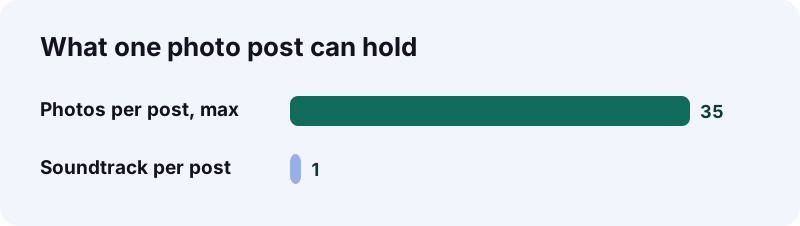
A photo post is a stack of up to 35 still images with one sound underneath. TikTok's help center lists the steps creators follow, and they explain what our tool can hand back to you.
“Tap Photo, then tap Upload to select photos from your device. You can add up to 35 photos.”
Creators can also add a filter, a sound, text and stickers, or crop their photos, according to TikTok's Making a post page. Some of those extras are baked into the image, others are not.
| Part of the post | Saved here? | Note |
|---|---|---|
| The photos | Yes, one JPEG each | Up to 35 per post |
| The sound | Yes, as an audio file | Same track as the post |
| Filters and crops | As served by TikTok | We don't undo edits |
| Caption and hashtags | No | Copy the text by hand |
| Comments and likes | No | Not part of the files |
Is a live photo the same thing?
No. TikTok describes a separate flow for live photos, taken with the Record button. This page is built for regular photo posts, the swipeable kind with several pictures.
What should you check before the TikTok photo download?
Confirm the post is public and still online, and copy the full link. These three checks prevent almost every empty result we see.
- Open the post in a private browser tab. If the photos show, it's public.
- Swipe through it once. If it's a video, use the video downloader instead.
- Use TikTok's Share button to copy the link, not a screenshot of the address.
- Check your storage. A long carousel adds dozens of files.
- Set aside a few minutes. The links last one hour.
Which links won't work at all?
- Posts from private accounts.
- Deleted posts or banned accounts.
- Drafts, which never leave the creator's phone.
- Posts blocked in your region.
How do you save the pictures, step by step?
Copy the link, paste it here, tap Download, then save each photo button in turn. The result appears in 0.6 to 1.8 seconds in our tests, with a count of the pictures at the top.
With your phone in hand
- In TikTok, open the photo post and tap the Share arrow.
- Tap Copy link.
- Open this page in Safari or Chrome and paste the link in the box.
- Tap Download and wait for the photo count.
- Tap Photo 1, confirm the save, then move on to Photo 2.
From a laptop or desktop
- Open the post on tiktok.com and copy the address bar.
- Paste it here and click Download.
- Click each photo button. Your browser saves it to the download folder.
- Optional: click Audio file for the soundtrack.
Chrome's help center adds that you can right-click an image and choose Save Image As to pick a folder. See Google's guide to downloading a file for the full menu.
What does each saved picture look like?
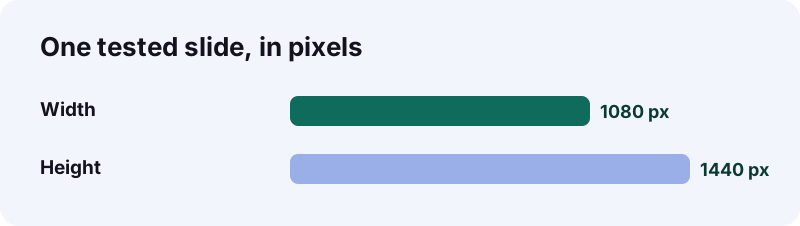
A portrait JPEG, usually the size TikTok serves to phones. The slide we measured was 1080 pixels wide and 1440 tall, a 3:4 frame of about 1.56 million pixels.
| Detail | What to expect |
|---|---|
| Format | JPEG (.jpeg or .jpg) |
| Shape | Portrait, 3:4 on the post we tested |
| Tested size | 1080 by 1440 pixels |
| Watermark | None added by us |
| Order | Photo 1 is the first slide of the post |
Creators upload all sorts of pictures, so other posts may come back at different sizes. We don't upscale or sharpen anything. You receive the image TikTok stores, at its own quality.
Why might one slide look softer than the rest?
Usually because of the source. JPEG is a lossy format, and a picture that was small or heavily compressed before upload stays that way.
- The creator uploaded a small or cropped picture.
- The slide is a screenshot of another screen.
- You zoomed far past the image's real size.
Will the JPEG files open on every device you own?
Yes. JPEG is the most common photo format around, so any phone, laptop, printer kiosk or editing app opens it. That's a real advantage over newer formats such as HEIC.
Wikipedia's JPEG article says that since its introduction in 1992, JPEG has been the most widely used image compression standard in the world, and that it typically achieves 10:1 compression with a loss of quality most people accept.
| Question | JPEG | HEIC |
|---|---|---|
| Introduced | 1992 | Specification finalized mid-2015 |
| Default on iPhone | Optional setting | Yes, since iOS 11 in 2017 |
| Android support | Universal | Android 10 (2019) with suitable hardware |
| Opens everywhere? | Practically yes | Not universally supported |
| File size | Larger | Smaller for the same quality |
Those HEIC facts come from Wikipedia's HEIF article, which also notes that some systems convert HEIC to JPEG automatically when sharing. With slideshow JPEGs you skip that problem entirely.
Can you edit the pictures after saving?
- Crop out a single tip or ingredient list.
- Combine several slides into one printable page.
- Mark up a slide with notes in your photo app.
How do you handle a carousel with 20 or 30 photos?
Save them in order, in one sitting, and let your browser download several files without asking each time. With up to 35 photos in a post, a little setup saves a lot of tapping.
“You can choose to allow sites you visit to download related files together.”
On a computer, Chrome keeps this under Settings, Privacy and security, Site Settings, Additional permissions, Automatic downloads. Turn it on only for sites you trust, and switch it back whenever you like.
A routine for long slideshows
- Create a folder named after the creator and the topic.
- Save Photo 1 to the last photo without skipping.
- Check the count on the page against the files you saved.
- Rename the files 01, 02, 03 so the order survives.
What if you only need two slides?
Just tap those two buttons. Each photo button works on its own, so there's no need to save the whole post.
Where do the saved pictures end up?
In your browser's download folder, not always in your photo gallery. Here's where to look on each device, based on Apple's and Google's own help pages.
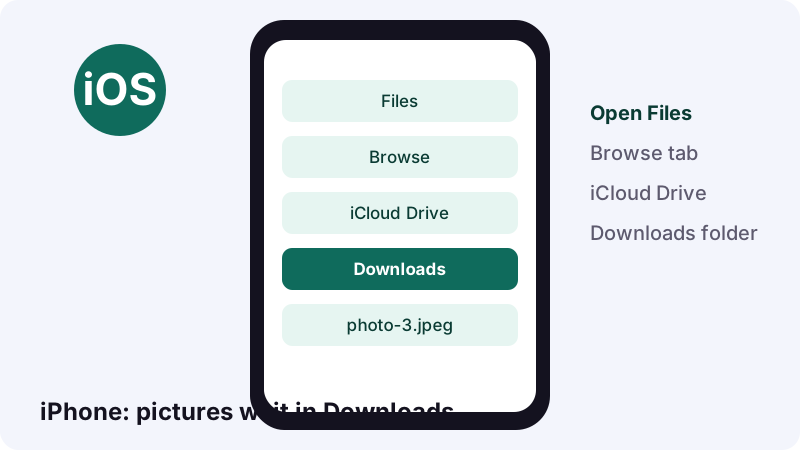
On iPhone and iPad, Apple says downloads from the internet go to the Downloads folder in the Files app, and Safari has a Downloads button next to its search field. See Apple's downloads page.
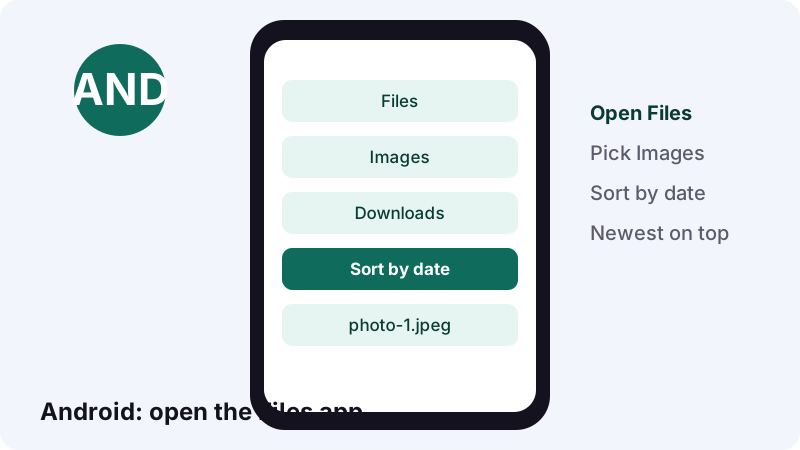
On Android, Google says files usually live in the Files app, though your phone maker may use another app. You can sort by date to see the newest first. Details are in Google's find files guide.
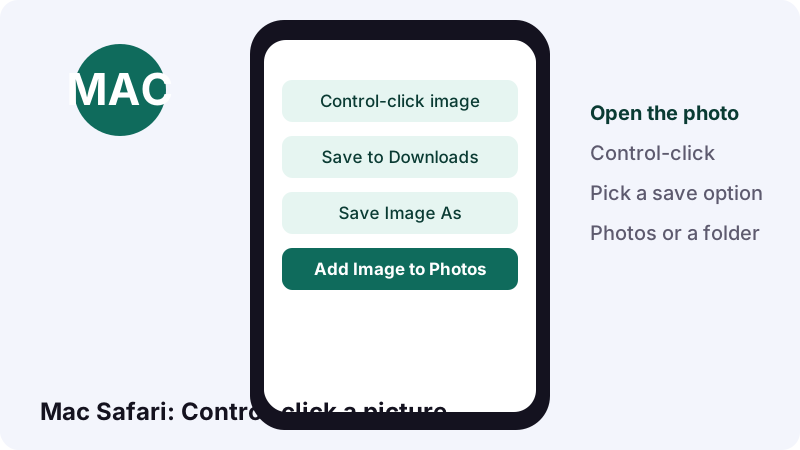
In Safari on a Mac, Apple lists three options when you Control-click a picture: Save Image to Downloads, Save Image As, or Add Image to Photos. Apple notes some images, such as background images, can't be saved that way. Read Apple's Safari guide, or our Mac guide.
| Device | Look here first |
|---|---|
| iPhone or iPad | Files, Browse, iCloud Drive, Downloads |
| Android | Files app, sorted by date |
| Mac with Safari | Downloads, or Photos if you chose Add Image to Photos |
| Windows or Mac with Chrome | Your default download location |
Can you keep the soundtrack of the slideshow?
Yes. Photo posts come back with their images and their audio track, so an Audio file button sits under the photo list. Tap it to keep the song or voice-over that plays behind the slides.
- The sound is one track, exactly as TikTok stores it.
- A 15-second sound came out at about 0.25 MB in our tests.
- If you only want sounds, the TikTok MP3 converter takes the same link.
Want to rebuild the carousel as a video with that sound? Any basic slideshow maker can line up the pictures and the audio. Keep the result for yourself unless the creator agrees.
Did the creator allow downloads, and why does it matter?
It matters for TikTok's own Save photo button. TikTok says that if you don't see the option to save a photo, the creator doesn't allow it. The download setting belongs to the creator, and some accounts have it off by default.
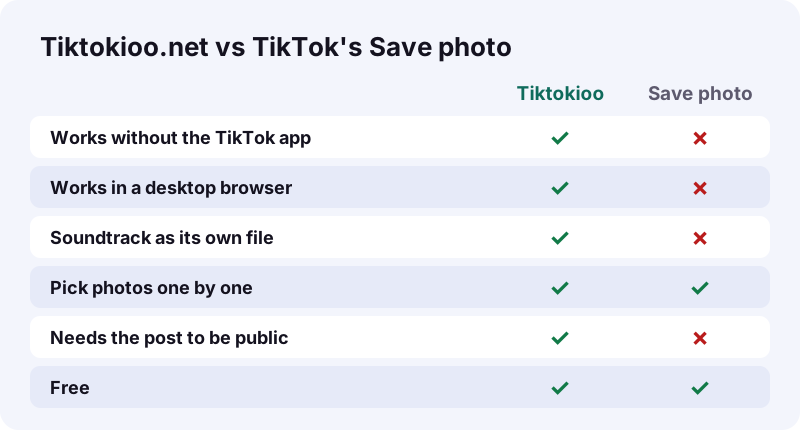
TikTok's Download content page describes its in-app route: Share, Save photo, then Select all or a few photos, then Save. It only works in the app.
The Manage video downloads page adds the rules creators live with:
- For private accounts and users under 16, downloads are off by default.
- A public creator can switch the setting on or off.
- Turning it off also covers posts already published.
- Copies saved while it was on stay on people's devices.
Our line: Tiktokioo.net only reaches pictures TikTok shows to anyone on the public web. If a creator keeps a post private, it stays private.
Nothing showed up. How do you fix a failed TikTok photo download?
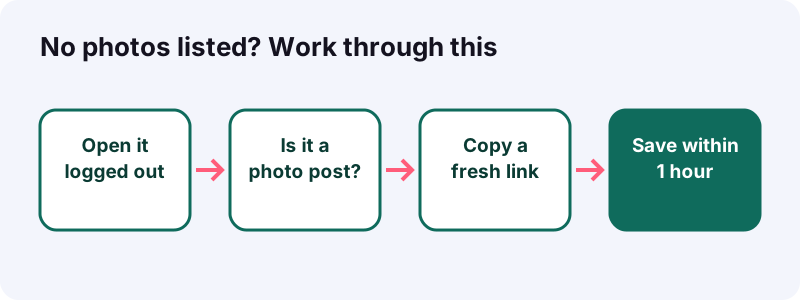
Most of the time the post isn't public anymore, the link is cut short, or the result page sat open longer than an hour. Go through the four checks below, in order.
| What you see | Likely cause | What to try |
|---|---|---|
| "We couldn't open that post" | Private, deleted or region-blocked | Open it logged out |
| Video buttons, no photos | It's a video, not a photo post | Use the video downloader |
| Photo button does nothing | Link older than 1 hour | Paste the link again |
| Picture opens in a new tab | Browser shows instead of saving | Right-click, then Save Image As |
- Refresh this page and paste again.
- Leave TikTok's in-app browser and use Safari or Chrome.
- Switch between Wi-Fi and mobile data.
Still empty? Send the link through our contact page.
Who owns the photos you just saved?
The person who took or made them. Saving a slideshow for personal reference is one thing; reposting it is another. The U.S. Copyright Office says a work is protected the moment it's created and fixed in a tangible form.
- Personal reference, like a recipe or a packing list: low risk.
- Sending one slide to a friend in a private chat: usually low risk.
- Reposting the photos on your own account: ask first, and credit.
- Selling prints or using them in ads: get a written license.
The Copyright Office FAQ also says registration is voluntary, so a missing registration doesn't make a photo free to use. Photos of people deserve extra care.
- Name the creator by their TikTok handle.
- Say where the picture came from.
- Mention anything you changed, like a crop.
What does Tiktokioo.net keep after you leave?
Nothing from the post. The pictures stream from TikTok's own servers to your device, and the download links expire after one hour. We never ask for a TikTok login.
- No account and no sign-up.
- No app or extension.
- No stored copies of photos.
- No watermark added to your pictures.
Read the details in our privacy policy or meet the team on the about page. Tiktokioo.net is independent and has no connection with TikTok or ByteDance.
Which other Tiktokioo.net tool might you need?
This page handles photo posts. The same link box exists on our other tools, each tuned to one kind of file.
- Video downloader without watermark for regular TikTok videos.
- Sound to audio file when you only want the track.
- Story download for public stories before they expire.
- Who saved my TikTok if you're curious about your own posts.
Questions people ask
How many pictures can I save from one post?
All of them. TikTok lets creators add up to 35 photos to a post, and you get one button per photo.
Is there a single button to save the whole slideshow?
No. Each photo has its own button, so you can pick only the slides you need. On a computer, allowing automatic downloads in Chrome makes saving many files faster.
Why don't I see an MP4 for my photo post?
Photo posts are stored as images plus a soundtrack, with no video file. You get the pictures and the audio instead.
Are the pictures JPEG or HEIC?
JPEG. The slides we tested came back as JPEG files, which open on practically every device.
Why did the picture open in a new tab instead of saving?
Some browsers display a picture instead of saving it. In Chrome on a computer, right-click it and choose Save Image As. In Safari on a Mac, Control-click it and pick a save option.
Do I need the TikTok app for a TikTok photo download?
No. A browser is enough. You only need the post's link, which you can also copy from tiktok.com.
Can I save photos from a private account?
No. We only reach posts any logged-out visitor can see. Private posts and drafts stay private.
Will the slides be in the right order?
Yes. Photo 1 is the first slide of the post. Rename the files 01, 02, 03 if you want the order to survive in other apps.
Can I get the song from the photo post too?
Yes. Tap the Audio file button under the photo list for the soundtrack.
How long do the photo links work?
One hour. After that, paste the TikTok link again for fresh buttons.
Is Tiktokioo.net part of TikTok?
No. Tiktokioo.net is an independent website with no connection to TikTok or ByteDance.
Sources
- Making a post — TikTok Help Center
- Download content — TikTok Help Center
- Manage video downloads — TikTok Help Center
- JPEG — Wikipedia
- High Efficiency Image File Format — Wikipedia
- Where to find downloads on your iPhone or iPad — Apple Support
- Save part or all of a webpage in Safari on Mac — Apple Support
- Download a file — Google Chrome Help
- Find & delete files on Android — Android Help
- Copyright FAQ: general information — U.S. Copyright Office