Save a TikTok on your Mac in Safari
- Open the post in your browser. Go to the TikTok video in Safari or Chrome on your Mac, or paste a link someone sent you.
- Copy the address. Click the address bar and press Command-C.
- Paste it into Tiktokioo.net. Open the Tiktokioo.net downloader, click the box and press Command-V, then click Download.
- Pick a file. Choose the MP4 without logo, the HD MP4 or the audio. The file link stays valid for 1 hour.
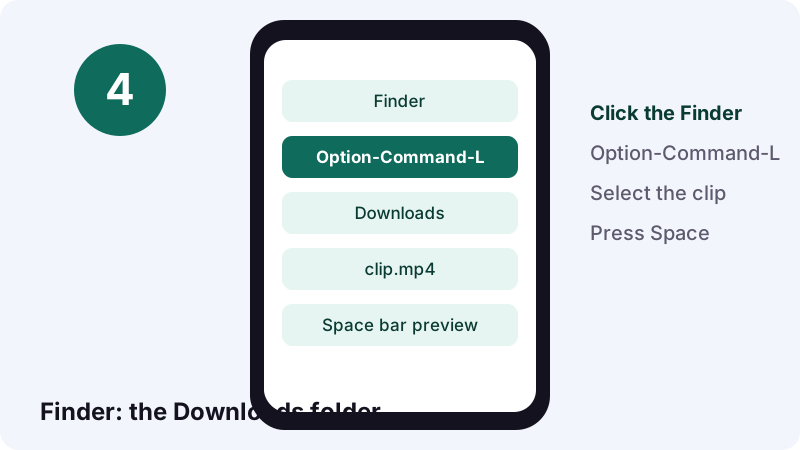
- Open it from Downloads. In the Finder, press Option-Command-L to jump to your Downloads folder, then press the Space bar to preview the clip.
Quick answer: what's the fastest way to save TikTok on Mac?
Copy the TikTok address, paste it into the Tiktokioo.net downloader, click Download, and pick a file. It lands in your Downloads folder, ready to play.
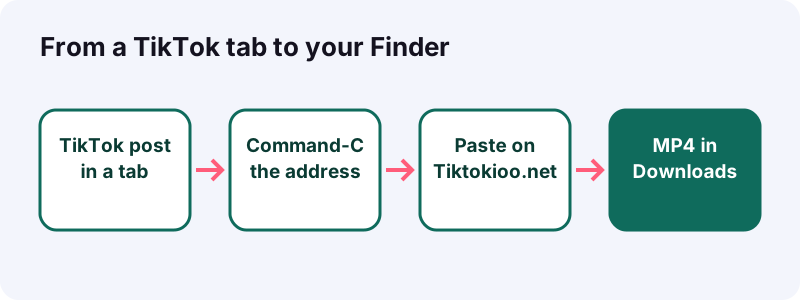
Quick answer: about 15 seconds, no install. You need a public post, a current browser and a few megabytes of disk space.
Here's a real-life version. You're at your desk, a friend drops a TikTok in a group chat, and you want it for a slideshow you're building in Keynote. One copy, one paste, and the clip is on your Mac before you've finished reading the chat.
Before you start: what does your Mac need?
Almost nothing: a browser, an internet connection, and a macOS version recent enough to play HEVC if you want the HD copy. Any Mac running macOS High Sierra or later handles HEVC, according to Apple.
- A browser you trust: Safari or Chrome are covered in this guide.
- macOS High Sierra (10.13) or later for HEVC playback and editing.
- Free disk space: a short clip is usually a few megabytes.
- A public TikTok post. Private, deleted and region-blocked posts won't open.
You won't need a TikTok account on the Mac, a browser extension, or a separate downloader app. The work happens on the web page, and the file goes straight from TikTok's servers to your Downloads folder.
One more thing to check: the post should open for anyone. A quick test is to open it in a private Safari window. If it plays there, you can save TikTok on Mac from that link without any sign-in.
Is the Mac even a common place for this?
More than you might think. Wikipedia, citing StatCounter, put macOS at a 15.33% share of desktop operating systems on the web in January 2023, second only to Windows. Plenty of people edit TikToks for school, work and side projects on a Mac.
Which link should you copy from TikTok on a Mac?
Copy the address of the post itself, the page that plays one video. A profile page or a search results page won't work, because it doesn't point to a single post.
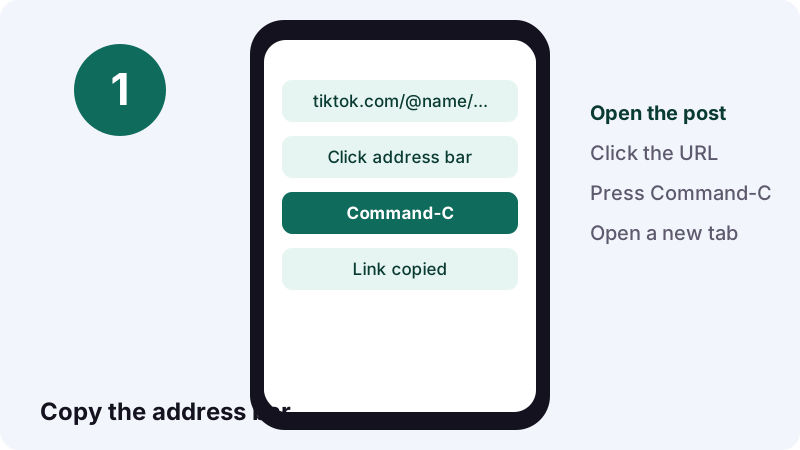
- Open the video on tiktok.com so it plays on its own.
- Click once in the address bar to select the whole address.
- Press Command-C; Apple's shortcut list says it copies the selection to the Clipboard.
- Switch tabs and paste with Command-V.
Got the link on your iPhone instead?
In the TikTok app, tap Share, then Copy link, as TikTok's sharing help describes for posts. Then send it to yourself, for example in Notes or Messages, and copy it again on the Mac.
How do you know you copied the right thing?
Paste it into the address bar of a new tab first. If the same single video opens, you've got it. If you land on a profile grid, go back and open the video itself.
How do you save TikTok on Mac with Safari, click by click?
Paste the link into Tiktokioo.net, click Download, choose a file, and let Safari finish. Safari puts the file in Downloads and lists it in its downloads button near the top right.
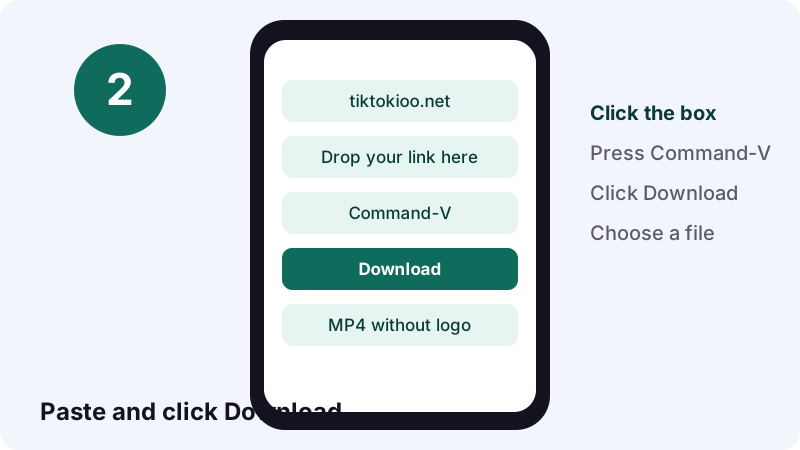
- Open Safari and go to the Tiktokioo.net home page.
- Click the link box and press Command-V.
- Click Download. Our backend reads a public post in roughly 0.6–1.8 s.
- Click MP4 without logo, HD MP4 or Audio file.
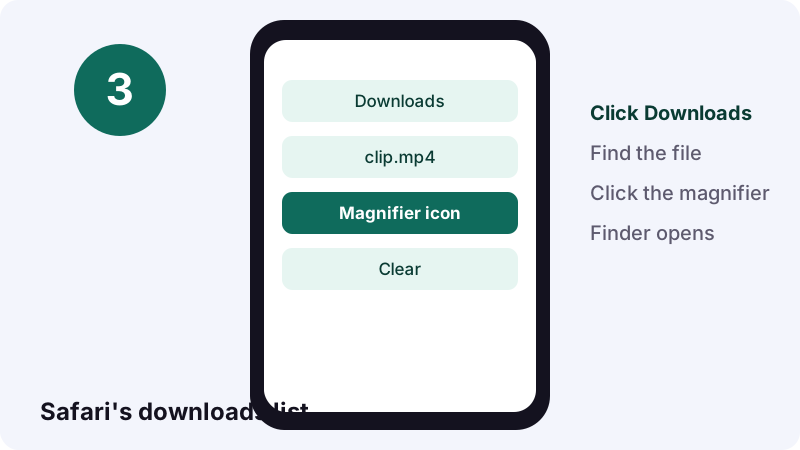
Apple's Safari download guide explains the list: click the downloads button, then the magnifying glass next to a file to show it in the Finder. You can pause and resume from the same list.
Why did the file vanish from Safari's list?
The file is still on your Mac; only the list entry is gone. Apple puts it this way:
“By default, Safari automatically removes an item after one day.”
You can change that under Safari > Settings > General, in the Remove download list items menu. The clip itself stays in your Downloads folder until you move or delete it.
Prefer Chrome? What changes?
Only where the progress shows up. In Chrome, a download icon appears next to the address bar, and the Download tray opens when the file is done.
- Paste the link into Tiktokioo.net in Chrome and click Download.
- Pick the MP4, the HD copy or the audio.
- Watch the download icon at the top right.
- When the tray opens, click the file to play it, or point at it and choose Show in Folder.
Google's Chrome download help confirms the default spot on a Mac: /Users/<username>/Downloads. You can also reopen the full list any time from Chrome's menu under Downloads.
Edge and other Chromium-based browsers behave much like Chrome here: paste, click, pick a file. The steps to save TikTok on Mac don't change with the browser; only the spot where the progress appears does.
Does Chrome on a Mac play the HD copy?
Recent versions do. Wikipedia lists HEVC support in Chrome since version 107 (October 2022) on macOS 11 or later, and in Safari since version 11 (September 2017). Opera followed with version 94 in December 2022.
Where did the file go? Finding it in Finder
In your Downloads folder. In the Finder, press Option-Command-L and Downloads opens, with the newest TikTok usually at the top when sorted by date added.
| Where to look | How to get there | Good for |
|---|---|---|
| Finder > Downloads | Option-Command-L | The default spot for Safari and Chrome |
| Safari downloads list | Downloads button, then magnifier | Files saved in the last day |
| Chrome Download tray | Icon next to the address bar | Your most recent downloads |
| Spotlight | Command-Space bar, type the name | When you remember part of the file name |
Can you check a clip without opening an app?
Yes. Select the file and press the Space bar. Apple's Quick Look shows a full-size preview, and it lets you play the video right there in the Finder.
Can you send downloads somewhere other than Downloads?
Yes, in both browsers. Point Safari or Chrome at a dedicated folder, such as one called TikTok Saves, and new files go there automatically.
- Safari: Safari > Settings > General, then the File download location menu.
- Chrome: menu > Settings > Downloads, then Change.
- Chrome, case by case: turn on Ask where to save each file before downloading.
Watch out: Apple warns that once a file is moved, or the save folder is switched, Safari's list loses track of it. The file is fine; just open it from the Finder.
Is a separate folder worth it?
If you save more than a few clips a week, yes. Downloads fills up with PDFs, installers and receipts. A single TikTok folder keeps your clips easy to find, back up and clear out.
Will the HD copy play? HEVC on a Mac explained
Usually, yes. TikTok's HD copy is often H.265, also called HEVC, and Apple says Macs with macOS High Sierra 10.13 or later can view, edit and duplicate HEVC media.
Why does TikTok bother? HEVC packs the same picture into a smaller file. Wikipedia gives an example: an hour of 4K video at 30 frames per second needs roughly 22.5 GB with HEVC versus about 45 GB with older H.264 profiles.
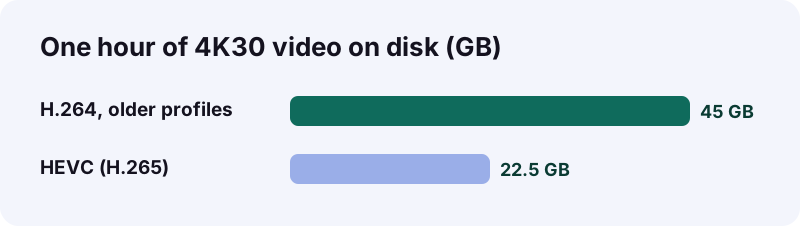
Apple's HEIF and HEVC page adds a caveat for older hardware: resolutions of 1080p or lower and frame rates of 60 fps or lower are more broadly compatible. Wikipedia credits HEVC with 25% to 50% better compression than H.264 at the same quality.

When should you skip HD?
- You'll send the clip to someone on an old PC or an older smart TV.
- You're importing into older editing software.
- You only need a quick rewatch, not a crisp edit.
- In those cases, take the regular MP4 from the downloader instead.
How do you make an H.264 copy for an old laptop or a TV?
Open the HEVC clip in QuickTime Player, choose File > Export As, and switch from Smaller File Size (HEVC) to Greater Compatibility (H.264). Your Mac already has everything needed.
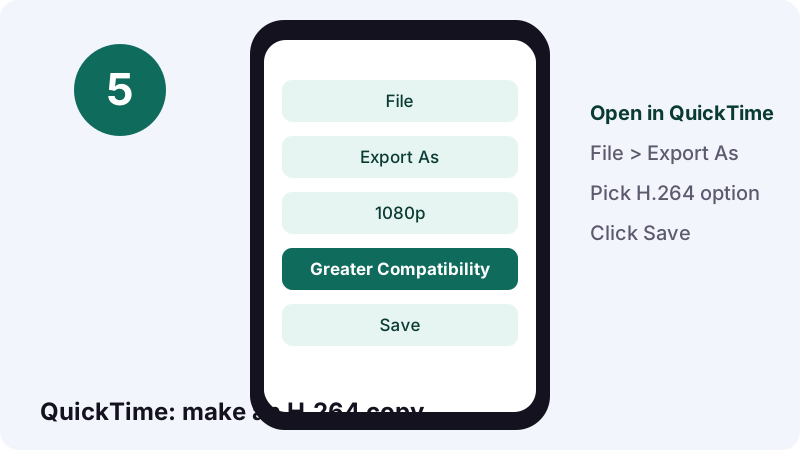
- Open the clip in QuickTime Player.
- Open the File menu, pick Export As, then the resolution you want.
- Change the menu to Greater Compatibility (H.264). If you see an HEVC checkbox instead, untick it.
- Click Save and give the copy a new name.
Is there a way to convert several clips at once?
Yes, from the Finder. Per Apple, Control-click the selected videos, go to Services, then Encode Selected Video Files, and choose an H.264 option from the Settings menu of the window that opens. It's handy after a batch of downloads.
How do you trim a saved clip without a video editor?
Use Quick Look or QuickTime Player. Both let you drag yellow handles to cut the start or end of a clip, and both come with macOS.
Trimming in Quick Look
- Select the clip in the Finder and press the Space bar.
- Click the trim button.
- Drag the yellow handles, and play to check your cut.
- Click Done, then choose whether to replace the original or create a new file.
Trimming in QuickTime Player
Open the clip and choose Edit > Trim. Apple's QuickTime trim guide says the area outside the yellow handles is removed; pressing and holding a handle reveals individual frames, which helps with an exact cut.
Scenario: you saved a cooking TikTok for a class presentation, but only the 20 seconds where the sauce comes together matter. Trim it in Quick Look, keep the original, and drop the short copy into your slides.
Should the video live in Photos or in a Finder folder?
Photos if you want it next to your own camera videos and synced with iCloud Photos; a Finder folder if you want plain files with their names, tags and Quick Look trimming.
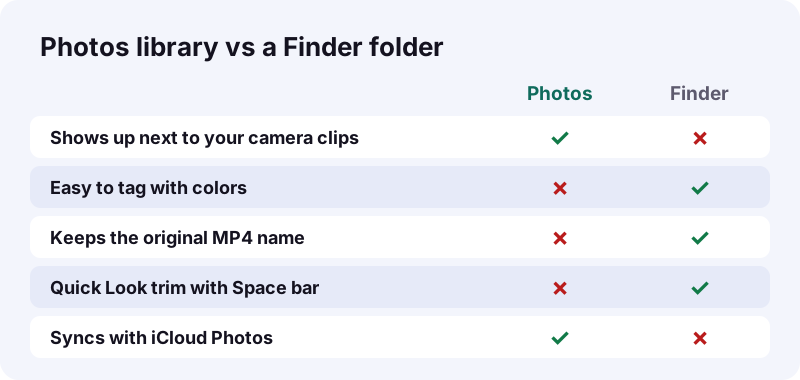
To add a clip to Photos, Apple's Photos import guide gives two ways: choose File > Import and click Review for Import, or simply drag the file from the Finder onto the Photos window or its Dock icon.
Can you import a whole folder of TikToks?
Yes. Drag the folder from the Finder into Photos and, according to Apple, it creates a new album matching the folder name. Imported items appear in the Imports album too.
Found it on your iPhone? How does AirDrop fit in?
Save the TikTok on your iPhone, then AirDrop the file to your Mac. Or AirDrop just the link and do the download on the Mac. Both are wireless and take seconds.
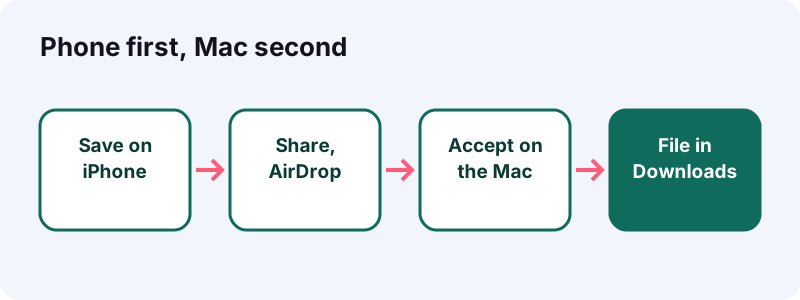
- Turn on Wi-Fi and Bluetooth on both devices.
- Keep them within 30 feet (10 meters) of each other.
- Sign in to the same Apple Account on both so items are accepted automatically.
- On the iPhone, open the file, tap Share, then AirDrop and pick your Mac.
Those requirements come from Apple's AirDrop guide for Mac, which also notes that if you leave Bluetooth or Wi-Fi range mid-transfer, the transfer continues over the internet.
Will AirDrop change the video format?
Sometimes. Apple says that when the receiving device doesn't support HEVC, items shared by AirDrop, Messages or email might be sent in a more compatible format such as H.264. A current Mac supports HEVC, so the file normally arrives as is.
What about sounds, slideshow photos and stories on a Mac?
Same routine, different button. Paste the post link, then choose the audio file, the images, or the story file instead of the MP4.
| You want | Use | What you get on the Mac |
|---|---|---|
| Just the music | TikTok MP3 converter | An M4A or MP3; a 15-second sound is about 0.25 MB |
| Every picture of a slideshow | TikTok photo download | JPEG images (1080×1440 in our tests), plus the audio |
| A public story | TikTok story download | The story's video, photos or sound, while it's live |
| A regular video | The main downloader | MP4 without logo, and HD when TikTok serves one |
Photo posts return images and audio, not an MP4. If you want a video of a slideshow, you'd build it yourself, for example by dropping the images into iMovie or Keynote.
Why not just screen-record the TikTok?
You can, but you'll get your screen, not the original file. Expect a lower-quality copy with browser controls, captions and the moving logo baked in.
If you still want to, Apple's screenshot and recording guide gives the shortcut: Shift-Command-5 opens the Screenshot tools, where you can record the whole screen, a window or a portion.
- Recording catches pop-up notifications that arrive mid-clip.
- The Options menu is built around microphones, so you may catch room noise instead of a clean soundtrack.
- The file size and resolution depend on your screen, not the source.
- A download gives you the clean file TikTok serves, in seconds.
When does a recording make sense?
When you need to show the TikTok interface itself, for a how-to or a bug report. For keeping the video, a download from Tiktokioo.net is cleaner.
Which Mac method fits which situation?
For nearly everyone, the browser download is the right default. The other methods help with edge cases like moving files from a phone or making a file for an older device.
Think of it as a decision you make once. A student who saves study clips every evening wants a fixed folder and tags. Someone who saves one funny video a month just needs Safari and the Downloads folder. Match the setup to how often you save TikTok on Mac.
| Situation | Best route | Why |
|---|---|---|
| You're browsing TikTok on the Mac | Copy the address, download in Safari or Chrome | Fastest, clean MP4, no extra steps |
| You found it on your iPhone | Copy link, paste on the Mac, or AirDrop the file | No need to search again |
| Your friend's laptop won't play it | QuickTime Export As H.264 | Greater compatibility |
| You want it in your photo library | Drag the file into Photos | Sits next to your own videos |
| You need a short excerpt | Quick Look trim | No editor needed |
| You need the TikTok interface on video | Shift-Command-5 screen recording | Shows the app, not only the clip |
Quick answer: if you're asking how to save TikTok on Mac for the first time, start with Safari and the regular MP4. Explore HD and the extras later.
Download stuck or file won't open: what's the fix?
Wait for the download to finish, retry if it was damaged, and check the post is still public. Apple notes you can't open an item while Safari is still downloading it.
| Symptom | Likely cause | Fix |
|---|---|---|
| We couldn't open that post | Private, deleted or region-blocked | Check the post opens for a signed-out viewer |
| That doesn't look like a TikTok link | You copied a profile or search page | Copy the address of the single video |
| Download paused in Safari | Network hiccup | Open the downloads list and resume it |
| File won't play or plays black | HEVC on older software | Download the regular MP4, or export H.264 |
| Link expired | More than 1 hour passed | Paste the post link again for a fresh file |
Is it the post or the Mac?
Try the same link on your phone. If it fails there too, the post is the problem. If it works on the phone, look at the Mac: free disk space, the browser's download location, and whether the download was paused in the browser's list.
Is it okay to keep TikToks on your Mac?
Keeping a public clip for your own viewing is the common, low-risk case. Reposting, selling or using someone's video in a paid project is different, and you should ask the creator first.
TikTok itself frames downloads around the creator's choice: its download help page says you can save videos for offline viewing and sharing if the post creator allows others to download their content.
- Fine: your own videos, clips saved to rewatch offline.
- Ask first: using a clip in a presentation others will see.
- Don't: reuploading as your own or monetizing it.
- Unsure? In the US, fair use depends on the facts of each use; read the four-factor summary from the U.S. Copyright Office.
Questions about a file we served, or a takedown request as a rights holder? Use our DMCA page or the contact form.
How do you keep a growing TikTok folder tidy?
Use one folder, clear names and Finder tags. Five minutes of setup saves you scrolling through hundreds of files named with long numbers.
- Create a folder called TikTok Saves and set it as your browser's download location.
- Rename clips with the creator and topic, for example
chef-sam-garlic-sauce.mp4. - Add a color tag: Apple's guide says you can select a file and use Control-1 to Control-7 for favorite tags.
- Once a month, preview with the Space bar and delete what you no longer need.
Tags show in the Finder sidebar, so one click lists every clip tagged, say, Recipes or Workouts. Apple's tagging guide also covers sorting and grouping by tag.
Ready to start? Head back to the TikTok downloader without watermark, paste your first link, and watch it land in your new folder. Curious about the other side of saving? Read who saved my TikTok.
Questions people ask
Do I need an app to save TikTok on Mac?
No. Copy the post's address, paste it on Tiktokioo.net in Safari or Chrome, and the file downloads like any other web download.
Where do saved TikToks go on a Mac?
To your Downloads folder by default. In the Finder, press Option-Command-L to open it.
Why doesn't my Mac play the HD TikTok?
The HD copy is often HEVC. Macs on macOS High Sierra or later handle it; on older software, download the regular MP4 or export an H.264 copy.
Can I save a TikTok on my Mac without the watermark?
Yes. Choose MP4 without logo on Tiktokioo.net and you get the video TikTok serves, without the moving logo.
Can I download a private TikTok on my Mac?
No. Only public posts open. Private, deleted and region-blocked posts can't be fetched.
How do I move a TikTok from my iPhone to my Mac?
AirDrop the saved file, or copy the link on the iPhone and paste it on the Mac to download it there.
How do I add a saved TikTok to Photos on a Mac?
Drag the file from the Finder onto the Photos window or its Dock icon, or use File > Import.
Why did Safari's download list lose my file?
Safari clears list items after one day by default. The file itself stays in your Downloads folder.
Can I save only the audio of a TikTok on a Mac?
Yes. Pick the audio file, or use the TikTok MP3 converter page. A 15-second sound is about 0.25 MB as M4A.
Is Tiktokioo.net made by TikTok or Apple?
No. Tiktokioo.net is an independent tool with no connection to TikTok, ByteDance or Apple.
Guides
Downloader — Save a public TikTok as a clean MP4, no logo.
Sources
- Download items from the web using Safari on Mac — Apple Support
- Download a file (Computer) — Google Chrome Help
- Using HEIF or HEVC media on Apple devices — Apple Support
- Mac keyboard shortcuts — Apple Support
- Trim a movie or clip in QuickTime Player on Mac — Apple Support
- Use AirDrop to send items to nearby Apple devices — Apple Support
- High Efficiency Video Coding — Wikipedia
- View and edit files with Quick Look on Mac — Apple Support
- Take screenshots or screen recordings on Mac — Apple Support
- macOS — Wikipedia