How to do a TikTok story download on Tiktokioo.net
- Catch the story while it's live. Open the public story in TikTok. You'll find stories on profiles, in your inbox and in the Following and For You feeds.
- Copy the link. Tap Share and then Copy link. Watching in a desktop browser? Copy the address bar instead.
- Paste it into Tiktokioo.net. Tap the box at the top of this page, paste, and press Download. A public post usually resolves in 0.6 to 1.8 seconds.
- Choose what to keep. Pick the MP4, the HD copy, the photos or the audio file. Each download link stays valid for 1 hour.
- Open it from your Downloads. iPhone: Files app, then Downloads. Android: the Files app. Computer: your Downloads folder.
Grab a TikTok story download in four taps
Copy the story's link, paste it into the box above, tap Download, then pick a file. That's the whole routine, and it takes less time than the story itself.
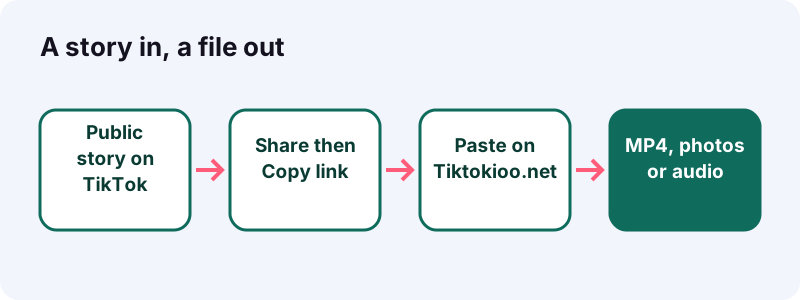
Picture it: you're on the bus, a friend's travel story is on screen, and you know it'll be gone by tomorrow. Two taps copy the link, one paste starts the TikTok story download, and the clip sits in your Downloads before your stop.
Quick answer: you need a public story, its link, and about ten seconds. No TikTok login, no app, no extension.
Can you really download a TikTok story?
Yes, as long as the story is public and still up. Tiktokioo.net asks TikTok for the same media it streams to any viewer and hands you a direct link to it.
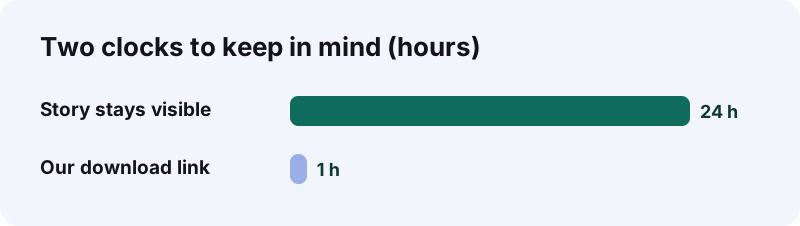
A story is short-lived by design. TikTok Help says stories stay visible for 24 hours and can be watched from a profile, the inbox and the For You and Following feeds. After that, only a Highlight keeps it on the profile.
“Highlights let you save Stories to your profile so they stay visible for more than 24 hours.”
What does the tool need from you?
- A link copied from the story (or the browser address bar).
- A story that anyone can watch, not one limited to friends.
- A browser: Safari, Chrome, Edge or Firefox all work.
- One hour, at most, to start the download after you hit the button.
Regular posts, not stories? Use the main Tiktokioo.net downloader instead; it's the same box, tuned for videos and slideshows.
Why do people rush to save stories?
Because stories disappear on a timer, and the good ones are often the ones you only half watched. A recipe step, a gig announcement, a cousin's birthday clip: once the day is over, it's gone unless the creator pins it.
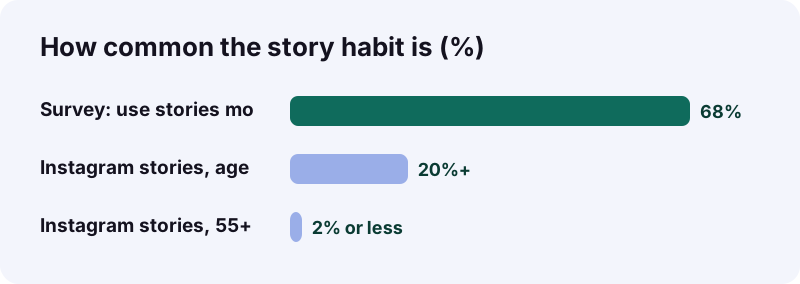
The format is huge. Wikipedia's article on stories reports that around 1.5 billion people used a stories feature every day on average in 2019. TikTok joined late: it added stories in March 2022, starting with 15-second videos that delete after 24 hours.
Three moments when a saved copy helps
- You're offline later: a flight, a subway tunnel, a cabin with no signal.
- You want to show it to someone who doesn't use TikTok, like a grandparent.
- It's your own story and you never kept the original file.
Before you tap Download: a 20-second checklist
Check three things: the story is public, it's still live, and you copied the story itself rather than the profile. Nearly every failed attempt misses one of these.
- Public account? You can see its posts without following.
- Still live? The story ring still shows on the profile.
- Right link? It came from the story's Share menu.
- Enough space? A few megabytes free is plenty for one clip.
- Right browser? Any current Safari, Chrome, Edge or Firefox works.
Saving several stories from one account?
Do them one at a time: copy, paste, download, then go back for the next. Each story has its own link, and each file link has its own one-hour window.
- Open the first story and copy its link.
- Download it on Tiktokioo.net.
- Return to TikTok, swipe to the next story, and copy again.
- Repeat until the ring is done.
Which stories open, and which stay locked?
Public stories open; private ones don't. If you had to be approved to see the account, our server can't see it either, because it never logs in as anyone.
| What you're looking at | Will a TikTok story download work? | Why |
|---|---|---|
| Story from a public account, still live | Yes | TikTok serves its media to any viewer |
| Story from a private account | No | Only approved followers can watch it |
| Story that passed its 24 hours | No | TikTok stops serving it |
| Story the creator deleted early | No | There's nothing left to fetch |
| Highlight on a public profile | Not guaranteed | Highlights follow the original story's visibility |
| Story blocked in your region | No | The post isn't served where the request comes from |
TikTok's privacy help explains why private is a hard wall: on a private account, people you haven't approved can't watch the videos at all, and others can't download the posts. See private vs public accounts.
How can you tell if an account is public?
Open the profile while signed out, or in a browser where you aren't logged in. If you can see the posts without following, the account is public and its live stories should work.
Where is the link hiding on a story?
Behind the Share button. Pause the story, tap Share, and choose Copy link if your app version shows it.
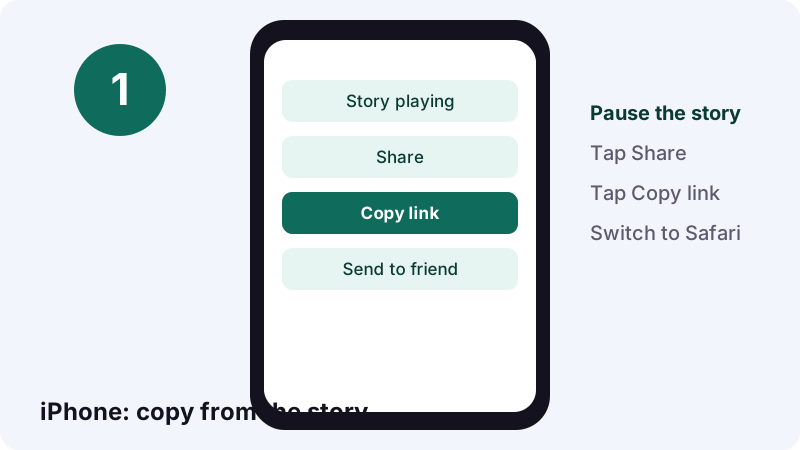
TikTok's own help mentions a Share button at the bottom of a story. Its general sharing guide walks through the same button for regular posts, plus a fix list for when sharing misbehaves.
The Share menu has no Copy link. Now what?
- Update the TikTok app; button labels move between versions.
- Switch between Wi-Fi and mobile data, then reopen the story.
- Restart the app.
- Still nothing? The story may not be public, so there's no shareable link.
Can you copy the link from a computer?
If the story opens on its own page in your browser, the address bar is the link. Select it, copy it, and paste it here.
How do you save a story on an iPhone, tap by tap?
Copy the link in TikTok, paste it into Tiktokioo.net in Safari, tap Download, and pick a file. Safari stores it in the Downloads folder of the Files app.
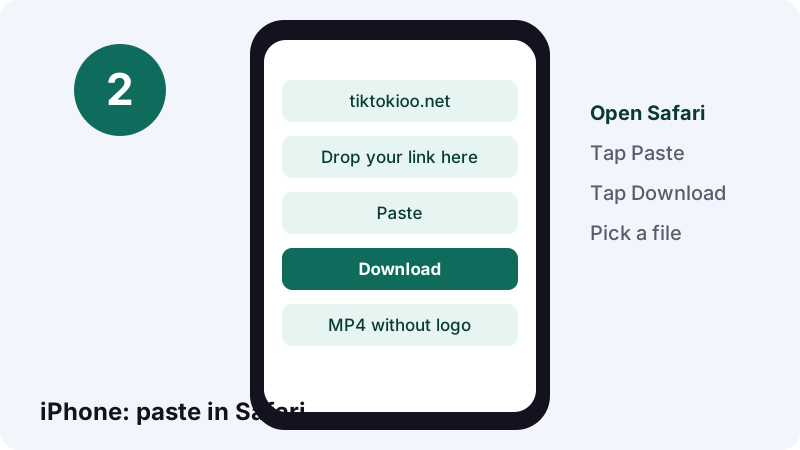
- In TikTok, pause the story and tap Share, then Copy link.
- Open Safari and go to Tiktokioo.net.
- Tap the box, tap Paste, then Download.
- Tap MP4 without logo, HD MP4, a photo or the audio file.
- Confirm the download when Safari asks.
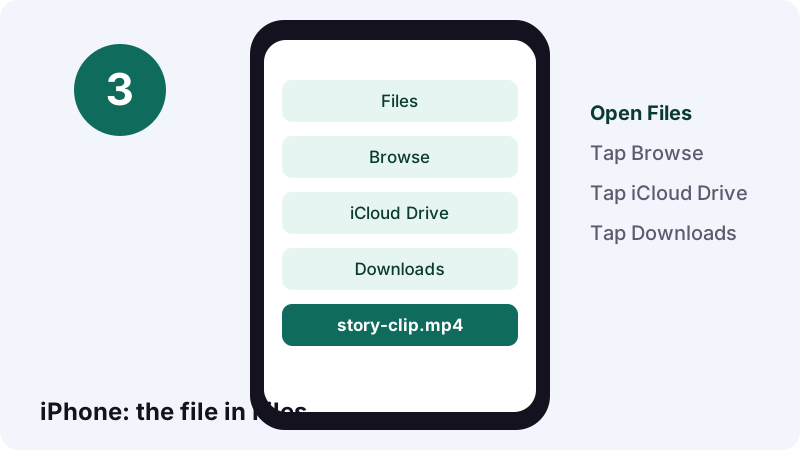
Apple's downloads help page gives the route: open Files, tap Browse, tap iCloud Drive, then Downloads. Safari also has a Downloads button next to its search field.
How do you save a story on Android?
Same moves, different browser: paste the link into Tiktokioo.net in Chrome, tap a format, and open the file from the Files app when the progress bar finishes.
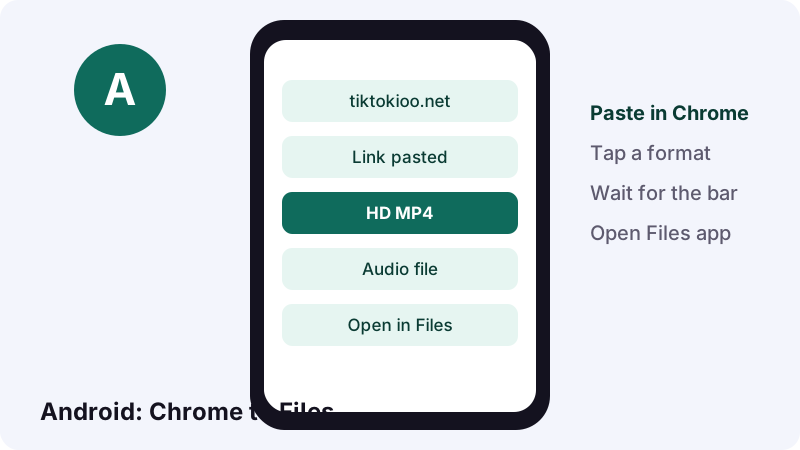
Google's Android files help says you'll usually find downloads in the Files app, and warns that some phone makers ship their own file app with a different name.
Can't spot the file?
- Open Files and sort by date, so the newest item is on top.
- Look under the Downloads or Videos category.
- Check Chrome's own downloads list from its menu.
Does it work in a browser other than Chrome?
Yes. Firefox, Edge or the browser your phone shipped with will do. Only the download list moves: look for it in that browser's menu. Same box, same steps as the home page downloader.
Does a TikTok story download work on a laptop or desktop?
Yes. On Windows, macOS, ChromeOS or Linux, paste the link into Tiktokioo.net and the file lands in your browser's download folder.
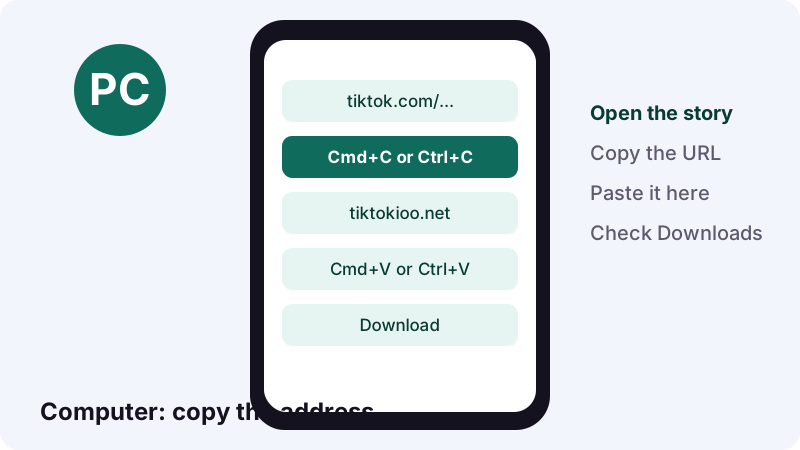
Handy trick: copy the link on your phone, send it to yourself in a chat or note, then paste it on the computer. Bigger screen, easier to sort files, and the HD copy plays fine on recent machines.
Mac owners have a whole walkthrough: how to save TikTok on a Mac, including what to do with HEVC files.
What lands on your device after the download?
Whatever TikTok serves for that story: a video file, a set of images, or a sound. Here's what to expect for each kind.
| Kind of story | Files you can pick | Good to know |
|---|---|---|
| Video story | MP4 without the logo; HD MP4 when TikTok has one | The HD copy is often H.265 (HEVC) |
| Photo story | Each image as a JPEG | Images we tested came out at 1080×1440 |
| Photo story with music | Images plus the audio track | There's no MP4 for picture posts |
| Any story with sound | An audio file (M4A or MP3) | A 15-second sound is about 0.25 MB as M4A |
Why won't my old phone play the HD file?
HEVC needs newer hardware or software. If the HD copy shows a black screen, pick the regular MP4 instead; it plays nearly everywhere.
Only want the song?
Grab the audio option, or use the TikTok MP3 converter, which is built just for sounds. For picture stories, the TikTok photo download page explains each image option.
How fast is a TikTok story download, and what slows it?
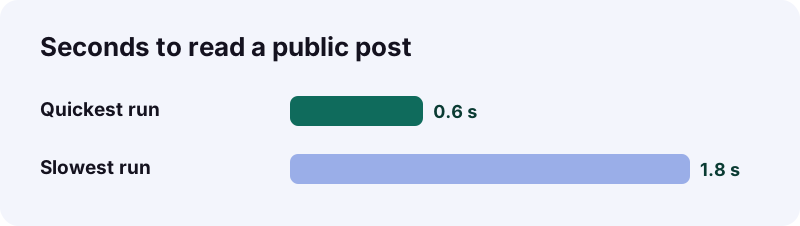
Reading the post is the quick part: on our backend, public posts resolve in 0.6 to 1.8 seconds. After that, your own connection decides how long the file takes to arrive.
What makes it feel slow?
- A weak signal on mobile data, especially for the HD copy.
- A phone that's almost out of storage.
- Lots of open tabs fighting for memory on an older device.
- Choosing HD when the regular MP4 would do for a quick rewatch.
Which file should you pick on a slow network?
Take the regular MP4 first. If you only care about the music, the audio file is tiny: a 15-second sound comes out around 0.25 MB as M4A. You can always come back for HD on Wi-Fi, while the story is still live.
How does the 24-hour clock change your plan?
It means do it now, not later. Once a story passes 24 hours, or the creator deletes it, TikTok stops serving the file and a TikTok story download has nothing to fetch.
| When | What to do |
|---|---|
| The moment you see it | Copy the link, even if you'll download later |
| Within the next hour or so | Paste it and download; don't count on the story lasting |
| After pressing Download | Save the file within 60 minutes; our link expires |
| Day two | Check the profile's Highlights; that's the only place it might survive |
Quick answer: a copied link doesn't freeze the story. If the story expires before you paste, the link stops working too.
Does the person who posted the story find out?
Our download itself never touches your TikTok account, since you don't sign in here. But watching the story in the app to copy its link counts as a view.
TikTok Help on watching stories is clear that creators can see you viewed their story, even if your account is private or your profile view history is off. Story views are also kept separate from post view history.
Can you avoid showing up as a viewer?
If someone sent you the link directly, you can paste it here without opening the story first. Otherwise, assume your view is visible, and don't treat saving as something secret.
Your own stories: how do you keep a copy?
Turn on Save to device before you post, or add the story to a Highlight. Both are built into TikTok, and neither needs our tool.
- On the Post screen, tap More options and switch on Save to device, as TikTok's download help describes.
- Already posted? Open your story and add it to a Highlight from your profile.
- Forgot both and the story is public? Paste its link here before the 24 hours run out.
Highlights keep the story's original visibility, so a friends-only story stays friends-only inside a Highlight.
Does turning off downloads protect old stories?
Only going forward. TikTok's download settings page notes that anything saved while downloads were allowed stays on the other person's device after you switch the setting off.
Working on a post you haven't published yet? Our guide on saving a TikTok draft without the watermark covers TikTok's own options, since drafts never get a public link.
Story download or screen recording: which keeps more?
The download keeps more. A screen recording copies your screen, with the clock, notifications and TikTok's buttons on top, while a download gives you the file TikTok actually serves.
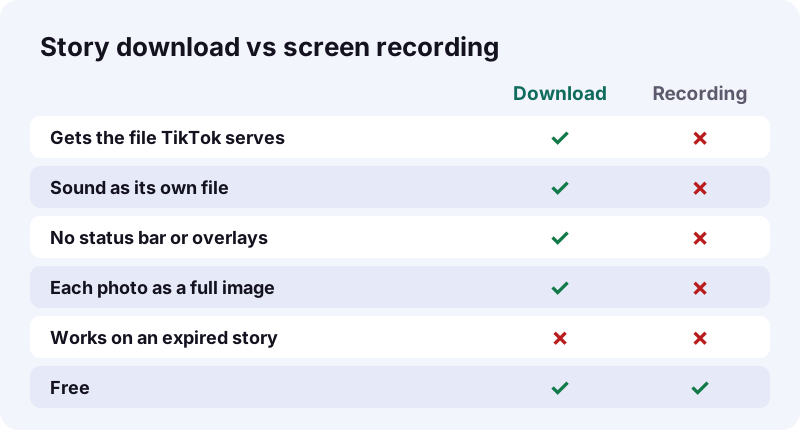
- Recordings pick up a text that arrives mid-story.
- Photo stories turn into a video of you swiping, not separate pictures.
- Recording sound can catch your own room noise or another app's audio.
- A download needs a public story; a recording works on anything you can see, which is exactly why it deserves extra care.
Something went wrong: how do you fix a failed save?
Most failures come from the story, not your phone: it expired, it's private, or the link points somewhere else. Run through this checklist before trying again.
| What you see | Likely reason | Try this |
|---|---|---|
| We couldn't open that post | Private, deleted, expired or region-blocked | Check the story is still live and public |
| That doesn't look like a TikTok link | You pasted a profile or other text | Copy the link from the story's Share menu |
| Connection problem | Your network dropped | Switch Wi-Fi and mobile data, then retry |
| File link no longer works | More than 1 hour passed | Paste the story link again for a fresh file |
| HD copy is black or silent | Your player can't decode HEVC | Download the regular MP4 |
Is the problem the story or the device?
Try the same link on a second device. If it fails everywhere, the story is the issue. If it works on the laptop but not the phone, check storage space and the browser's download settings.
Can an expired story be recovered?
Not by us. Only the creator still has it, in their own story archive, and only they can add it to a Highlight.
What's fair to do with a saved story?
Keep it for yourself, and ask before you share it. Saving a friend's story to rewatch is very different from reposting a stranger's content as your own.
- Okay: keeping your own stories, saving a tutorial to follow offline.
- Ask first: putting a friend's story in a group chat or a family video.
- Don't: reposting someone's story as yours, or selling or monetizing it.
- Don't: using our tool to get around a block or a private account.
In the US, fair use is judged case by case. The U.S. Copyright Office lists four factors, including the purpose of the use and its effect on the market for the original. When unsure, ask the creator. Rights holders can reach us through our DMCA page.
Reshared a story and want to undo it? Here's how to remove a repost on TikTok. Questions about the site itself go to our contact page or the about page.
What happens to your link on our side?
We look up the post, return links to TikTok's own servers, and keep nothing. There's no gallery of other people's downloads, and no account to remember you by.
- Files come from TikTok's CDN, not from a copy on our servers.
- Each download link expires after 1 hour.
- No login, so we never see your TikTok password.
- Details live on our privacy page.
Want the full downloader for regular posts? The TikTok downloader without watermark on our home page handles videos, HD copies and slideshows. Curious who keeps your posts? Read who saved my TikTok.
Questions people ask
Is a TikTok story download free here?
Yes. Tiktokioo.net doesn't charge, doesn't ask for an account and doesn't limit how many public stories you save.
Can I save a story from someone I don't follow?
Yes, if their account is public and the story is still live. Following doesn't matter; visibility does.
What if the story is from a private account?
It won't open. Our server doesn't sign in, so it can only see what any visitor could see.
How long do I have before the story disappears?
TikTok shows stories for 24 hours, unless the creator deletes it sooner or adds it to a Highlight.
Will the clip have the TikTok logo on it?
Pick the MP4 without logo option and you get the clean video TikTok serves, without the moving watermark.
Can I download just the photos from a picture story?
Yes. Each image comes as its own JPEG, and the sound is offered as a separate audio file. Picture posts have no MP4.
Why did my download link stop working?
Our file links expire after 1 hour. Paste the story link again for a fresh one, as long as the story is still up.
Do I need the TikTok app?
Only to find and copy the link. The download itself happens in your browser on Tiktokioo.net.
Will the person know I viewed their story?
TikTok shows creators who viewed their story, so watching it in the app is visible. Downloading through us doesn't use your account.
Is Tiktokioo.net run by TikTok?
No. Tiktokioo.net is an independent tool and has no connection with TikTok or ByteDance.
Sources
- TikTok Stories — TikTok Help Center
- Watching Stories on TikTok — TikTok Help Center
- Choosing between a private or public account — TikTok Help Center
- Download content — TikTok Help Center
- Manage video downloads — TikTok Help Center
- Sharing on TikTok — TikTok Help Center
- Where to find downloads on your iPhone or iPad — Apple Support
- Find & delete files on Android — Android Help
- U.S. Copyright Office Fair Use Index — U.S. Copyright Office
- Story (social media) — Wikipedia